So, picture this: me trying to dodge my energetic 4-year-old while also attempting to put some serious order into my biz.
Running a business with a toddler in tow can feel like a circus act sometimes, but hey, it’s all about figuring it out. This year, I’m ready to roll with the punches and handle whatever comes my way…hopefully without losing my cool!
This January, I decided to kick off a declutter challenge. Not just for my desk (which desperately needed it), but for my entire business—including my website. I wanted to see if tidying up my physical workspace could somehow clear up the mental clutter when it comes to running my business too.
The plan? Each day, I get rid of a bunch of stuff. Day 1 – bye-bye to one thing, Day 2 – two things hit the road, and so on. But hey, I’m not sticking to it religiously. Some days, like yesterday, I waved goodbye to 14 things! It’s been kind of therapeutic, honestly.
And you know what I realized? My website needed the same treatment.
Why Your Website Clutter is Actually Costing You Money
Here’s the thing nobody tells you when you’re starting out: that “more is more” approach? It’s killing your conversions.
I see it all the time with local North Alabama businesses—beautiful service-based companies with hearts of gold and websites that are trying to do everything at once. Ten navigation menu items. Sixteen different calls to action. Forty-seven pop-ups (okay, maybe not forty-seven, but it feels like it).
Your potential clients land on your site and their brain immediately goes into overload. It’s like walking into a store where every single item is screaming “BUY ME!” at the same volume. You know what happens? They freeze up and leave.
Think of your website like your favorite local coffee shop here in Decatur. When you walk in, you don’t want to see every menu item ever created plastered on the wall, right? You want to see the good stuff—the specialties, the favorites, the things that make that place that place. Clean, simple, easy to order.
That’s what we’re going for with your website.
4 Easy-Breezy Ways to Declutter Your Website
1. Give Your Brand a Good Ole Once-Over
Let’s start with a chill walk through your brand and website. Think of it like window shopping your own business. No judgment, just honest observation.
Here’s what I want you to do: Grab your phone (or laptop if you’re feeling fancy) and pretend you’re a brand new customer who just heard about your business from a friend. Go to your homepage. What do you see first? Can you tell what you do within about 3 seconds?
If someone has to scroll, click around, or play detective to figure out what you offer, that’s a problem. Your homepage should answer three questions immediately:
- What do you do?
- Who do you do it for?
- Why should they care?
Now keep clicking through your site like you’re actually trying to hire yourself. Are there pages that make you cringe a little? Maybe that “Coming Soon” page that’s been coming soon for two years? Or the blog post from 2019 that you never quite finished? What about that client project you worked on for 4 months and it’s still on your list of things to add to your portfolio?
The cool stuff stays, the not-so-cool stuff? That’s gotta go.
Action steps:
- Remove any pages that aren’t serving you anymore
- Get rid of outdated testimonials (if Sarah’s review mentions your “new” service that’s now three years old, it’s time to refresh)
- Delete old promotional banners for sales that ended last spring
I recently did this for my own site and removed an entire services page that wasn’t converting. Turns out, I was confusing people by offering too many options. Once I simplified, my inquiries actually went up. Wild, right?
2. Keep Your Navigation Easy-Peasy (Like Sunday Morning)
You definitely don’t want your peeps getting lost in a maze, right? Your website navigation should be so simple that your aunt could find what she needs without calling you for help.
Here’s the truth bomb: Most small business websites need at least 3-5 navigation items. That’s it.
The essential pages (or sections) most service-based businesses actually need are:
- Home
- About
- Services Offered (or What I Do)
- Portfolio/Work (if applicable)
- Contact
- Maybe a Blog or Resources page
That’s it. That’s the list.
Everything else? It can live in your footer, in a resources dropdown, or—and hear me out—it might not need to exist at all in your eyes.
Pro tip for North Alabama business owners: If you serve multiple towns (Decatur, Huntsville, Athens, Madison), you might be tempted to create separate location pages. Unless you have physical locations or service specific physical locations, you probably don’t need to do this. One good services page with a mention of your service area works just fine and keeps things clean.
Double-check those links too. Click through every single one. Make sure:
- They’re taking folks to the right spots
- They’re not broken (404 errors are the worst first impression)
- They open in the right window (external links in new tabs, internal links in the same tab)
- Your contact forms actually work (test them yourself!)
I can’t tell you how many times I’ve found broken links on client sites that have been sending people to nowhere land for months. It’s like having a “We’re Open!” sign on a locked door (which literally happened to me yesterday at my favorite lunch spot in Huntsville, suuuuuuch a let down! And my craving is still there!).
3. Freshen Up Your Content Like Sweet Tea on a Hot Day
Start with the low-hanging fruit:
Your About page: When’s the last time you updated your photo? If you’re still using that professional headshot from 2018 but you’ve changed your hair three times since then, it might be time for a refresh. People want to know who they’re working with, and an old photo creates a tiny moment of disconnect when they finally meet you in person.
Also, update your bio to reflect where you are now. If you’re still talking about being brand new to business but you’ve been running strong for five years, that’s not helping you. Own your experience, friend.
Your Services page: This one’s the BIGGEST in my opinion. Are you still listing services you don’t really offer anymore? Or maybe you’ve added new packages but forgot to add them to your website?
Your services page should reflect what you’re actually selling right now, with current prices (or at least “starting at” prices if you prefer), and a clear path to booking or inquiring.
Your Blog: Oh boy, the blog. Look, I get it. Blogging is hard when you’re busy running a business. But if you have a blog on your site, it needs some love.
- Make sure your blog post links are taking people where they need to go and not to a dead-end 404 error page
- Update any posts with outdated information (if you have a “2022 Trends” post still floating around, either update it or delete it)
- Consider refreshing your most popular posts with new information (hello, SEO boost!)
Real example: I had a client who kept getting questions about a service she stopped offering two years ago. Guess what? It was still featured prominently on her services page. Once we removed it, those confusing inquiries stopped and she started attracting the right people.
Content audit checklist:
- Remove references to old team members who’ve moved on
- Update any mentions of “current” events that aren’t current anymore
- Check that your contact information is correct everywhere it appears
- Make sure your business hours (if applicable) are accurate
- Update any statistics, numbers, or data points that might have changed
4. Level Up Your SEO Game (Without Getting All Technical About It)
Okay, I know. The word “SEO” makes a lot of folks’ eyes glaze over. But stick with me, because this is the stuff that helps people actually find your business when they’re searching for what they need.
Think of SEO like leaving breadcrumbs for Google. You’re just helping the search engines understand what your website is about so they can show it to the right people.
Keywords: These are just the phrases people type into Google when they’re looking for businesses like yours. For local service-based businesses, this usually includes your service + your location.
Examples:
- “wedding photographer Decatur Alabama”
- “bookkeeping services Huntsville”
- “family law attorney Madison County”
- “house cleaning Athens AL”
Sprinkle these naturally into your:
- Page titles
- Headings
- Body content
- Image file names (yep, those matter!)
Notice I said naturally. Don’t go stuffing keywords in every sentence like you’re making a Thanksgiving turkey. Google’s smart enough to know when you’re being weird about it.
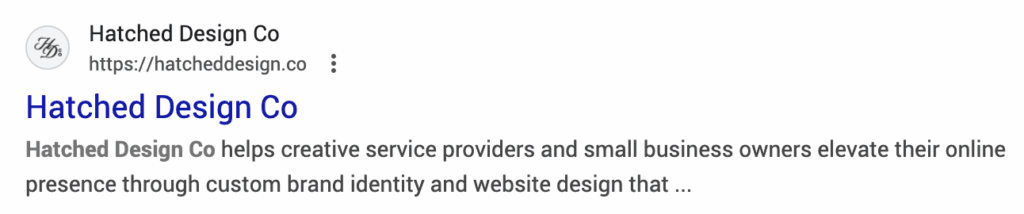
Meta descriptions: These are the little snippets that show up under your page title in Google search results. They don’t directly affect your ranking, but they DO affect whether someone clicks on your site or your competitor’s.
Each main page should have a unique meta description that:
- Tells people what they’ll find on that page
- Includes your main keyword
- Is between 150-160 characters
- Sounds like a human wrote it (because a human did—you!)
Alt text for images: This is probably the most skipped step I see, but it’s so important. Alt text does two things:
- Helps visually impaired visitors understand what’s in your images
- Tells Google what your images are about with the keywords used to describe it
Instead of “IMG_1234.jpg,” describe what’s actually in the photo. “Bride and groom under willow tree in Huntsville, Alabama on wedding day” is way more helpful (and searchable) than “IMG_1234.jpg.”
Pro tip: Go through your website images right now and add alt text to anything that’s missing it. It takes maybe 30 minutes per page and makes a real difference.
Page speed matters too. If your site takes forever to load, people bounce. And Google notices. Compress those giant image files (you don’t need a 5MB photo on your homepage, I promise), and consider using a tool like TinyPNG to optimize your images to 800kb max per image.
The Decluttering Mindset: Less Really is More
Here’s what I’ve learned through my own decluttering journey and helping dozens of small business owners clean up their websites: Every single thing on your website should earn its place there.
If you can’t point to a specific reason why something exists on your site—if it’s just there because it was there before, or because you saw it on someone else’s site—it might be time to let it go.
Ask yourself these questions:
- Does this help my ideal client understand what I do?
- Does this move them closer to working with me?
- Does this build trust?
- Is this still relevant to my business today?
If the answer’s no, cut it loose.
I promise you, your website will thank you. Your visitors will thank you. And your brain will definitely thank you when you stop cringing every time someone says they looked at your website.
What Happens After You Declutter
Your ideal clients can actually find what they’re looking for. They don’t have to dig through seventeen pages to figure out how to work with you. They can see that you’re professional, current, and on top of your business.
And for you? Updating your website becomes way less overwhelming. When you only have the essentials, maintaining things takes minutes instead of hours.
Plus, a decluttered website just feels better. It’s like that satisfying feeling when you clean out your car or organize your pantry. Everything has a place, everything makes sense, and you can actually find what you need.
Ready to Stop Wrestling with Your Website?
Listen, I get it. You started your business to do the thing you love—whether that’s styling hair, planning events, keeping books, or building custom furniture. You didn’t sign up to become a web designer on top of everything else.
Every small business owner deserves a website that makes them feel confident, not stressed. One that’s clear, not cluttered. One that helps you make money, not just look pretty.
If you’re ready to have a website that actually works for you (instead of against you), I’d love to chat. My suite of brand and website design services is specifically designed for small business owners who need a website that converts clicks into raving followers (and customers!) without all the headache.
I’m here to help you build a brand that’s rooted in strategy, attracts your ideal audience, and gives you the confidence to launch—or relaunch—with a website you’re actually proud to share when you meet up with your aunt again.
So what do you say? Ready to declutter that website and start the year fresh?
Let’s do this thing.